Services Overview
Services define which ordering methods your establishment offers.
You can enable or disable each service independently depending on your operations.
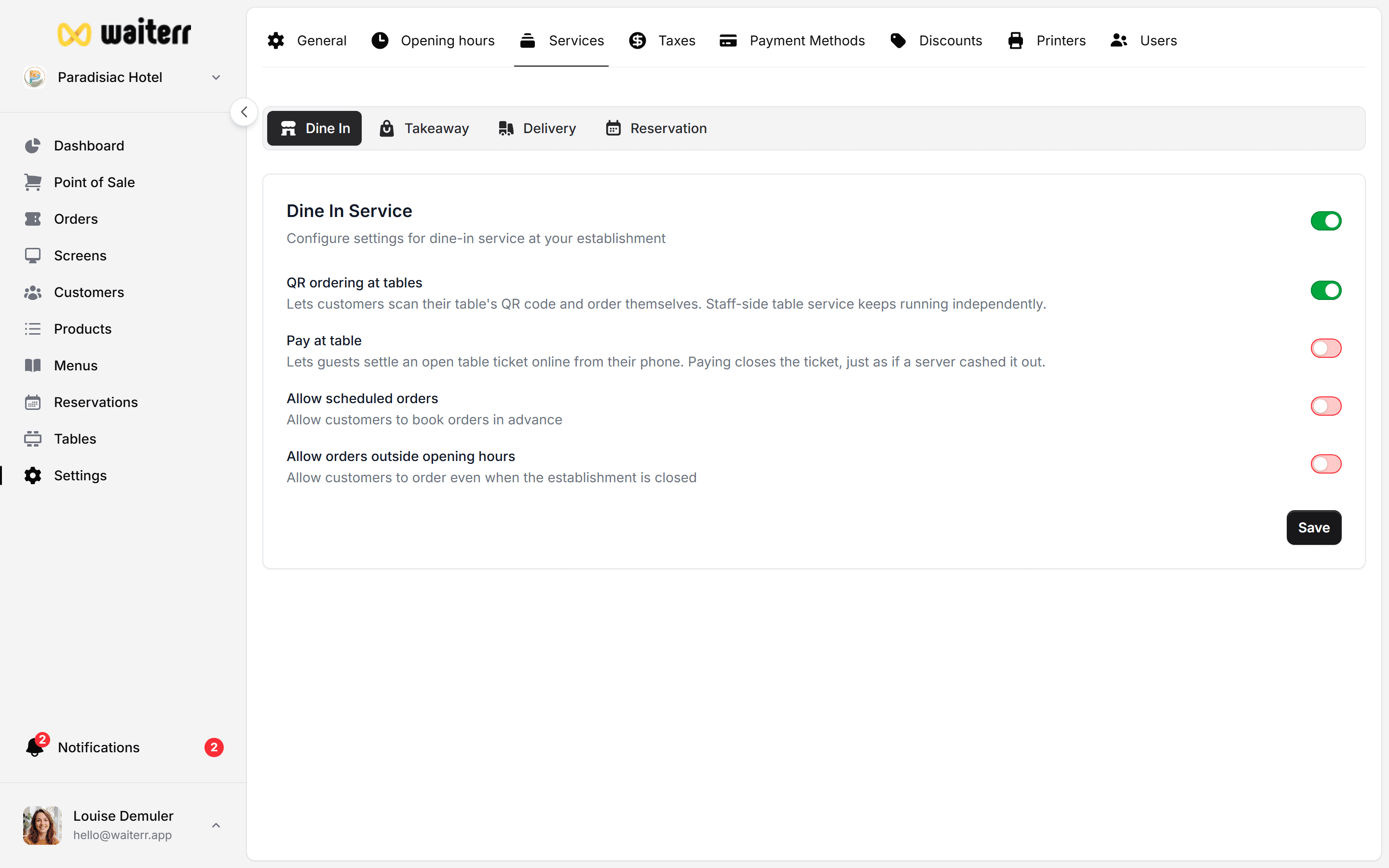
Available Services
Waiterr Manager supports the following services:
- Dine-In / POS – Orders made inside the venue
- QR Ordering – Customers scan a QR code to order
- Takeaway – Pick-up orders
- Delivery – Orders delivered to customers
- Reservations – Table booking system
Each service impacts customer interfaces, online ordering options, and internal workflows.
Activating and Deactivating Services
You can toggle services:
- From the Dashboard (service buttons)
- Inside Establishment Settings → Options
- Inside KDS screens (quick toggles for operations)
🟢 Green = service active
🔴 Red = service inactive
Learn more →
Service Toggles
Why Service Configuration Matters
Your enabled services define:
- What customers see online
- Which options appear in the POS
- Allowed delivery areas
- Reservation availability
- Payment methods accepted per service
- Preparation workflow
Next Steps
👉 Dine-In / POS
👉 QR Ordering
👉 Takeaway
👉 Delivery
👉 Reservations
Last updated on